The old laptop in the corner. Or, context is king.
My Obsidian vault has over 800 documents. Daily work logs, journal entries, project docs, frameworks, inspo, and weekly plans going back years.
But, let's be honest. Most of them are doing nothing.
The Zettelkasten promise — build a network of notes and connections will emerge over time — sounds great in theory. You write something in a daily log, capture a nugget of inspiration from a social feed, jot down a half-formed idea in a project doc. Months later, those pieces are supposed to click together through the magic of backlinks and meticulous PARA curation.
Future you will swim a sea of aha's and galaxy brain moments.
Right?
The problem
So what are we talking about here. It's not really a search problem. I can search my vault. The issue is that keyword search only finds what you already know to look for. It can't tell you that a customer research note from July is conceptually related to a strategy doc from last week — not if they don't share the same words. For me at least, these connections stay buried.
I use Claude as a work co-pilot — it reads my notes, understands my projects, and helps me think through strategy. But to do that, it needs context. And for a long time, "context" meant loading about 28,000 tokens of vault content at the start of every session. Most of it irrelevant to the question at hand. Meanwhile, the notes that were relevant sat untouched because neither of us knew to look for them. 🙃
The fix: semantic search. Instead of dumping everything into context, let the AI ask my vault specific questions and get back the relevant pieces — including ones connected by meaning, not just matching keywords. All 800 of these carefully captured notes should be put to work, not just the ones I remember writing.
Because, let's face it. My memory is awful.
Enter QMD, which I stumbled on in this amazing thread. QMD indexes markdown files and runs three types of search — keyword matching, vector similarity, and a hybrid mode that combines both with LLM re-ranking. All local.
Now, the catch. The AI models QMD uses need about 3 GB of RAM. My MacBook has 8 GB, and it was already maxed out. Running the models locally caused full system freezes and hard reboot territory.
The solution
A second Macbook. Obviously. 🙄
In the corner of my home office, my old laptop was gathering dust. An Intel i5 MacBook with 8 GB of RAM, setup with Ubuntu (from my Vivaldi days).
Here's what I built:
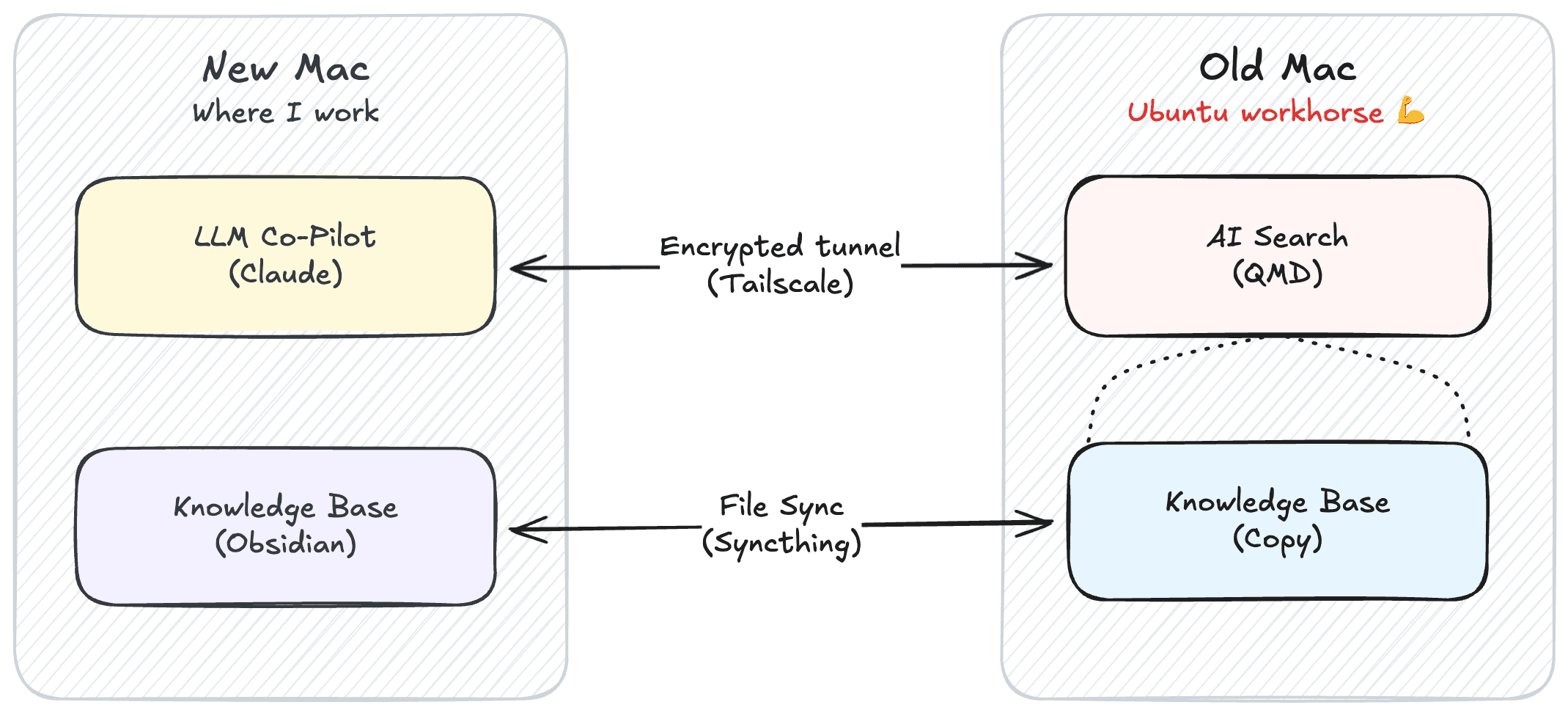
Five open-source tools make it work:
- QMD — the search engine itself. Indexes markdown, generates embeddings, runs hybrid search with re-ranking. (🎩-tip to Tobi Lutke).
- Tailscale — creates an encrypted tunnel between my Mac and the Ubuntu laptop. No port forwarding, no VPN config. Just works.
- Syncthing — keeps the Obsidian vault synchronized between both machines. I write on the Mac, notes on the Ubuntu laptop stay current.
- supergateway — a bridge that exposes QMD's local interface over HTTP so my Mac can connect to it remotely. Because, yes, I do leave my home office.
- node-llama-cpp — runs the AI models (three small ones, totaling about 3 GB) entirely on CPU. No GPU required (in case you too are leaning on 2015 technology 🤝).
The whole thing runs as a background service on the Ubuntu laptop. It starts automatically, restarts on failure, and sits there quietly indexing my notes. Beautiful.
The results
No more loading a pile of unnecessary context into Claude at the start of each chat. The Ubuntu laptop handles all the inference over the encrypted tunnel, and it's fast enough.
As a side-quest, I set up Docker on the same machine with a local n8n container to add some light monitoring so I know if the machine goes caput. And as a bonus, because the machine is always on, I can finally keep time-triggered automations on time, every time.
Some numbers:
- 812 files indexed across 5 collections
- 85-90% reduction in tokens loaded per session (from ~28K to ~3-5K)
- Three search modes: keyword (instant), semantic (a few hundred ms), and hybrid with re-ranking (1-2 seconds but highest quality)
It's not blazing fast. But neither is letting Claude loose on my entire Obsidian vault. The real payoff isn't speed, though. It's that it feels like my notes are finally working for me.
Last week I searched for product marketing case studies for a job application. The semantic search surfaced a daily work log from six months ago where I'd described a customer case study and custom GPT workflow I'd built. It connected that log to random scribblings I'd made about the project in weekly retros just last month, and together, told a complete story I would never have pieced together on my own.
The takeaway
You don't need expensive hardware to build smart tools. An old laptop, some open-source software, and a stubborn refusal to accept 800 idle notes as the cost of having a "second brain."
The Zettelkasten promise was never about storing notes, after all. It was about the network effect — notes becoming more valuable as they connect to each other. But that only works if you can actually traverse the network. Not just follow the links you explicitly create, but discover the connections you didn't know were there in the first place.